Zen-Scripts Briefing: Post-Patch Slump Triage
Briefing memo on post-patch slump triage for NBA 2K Cronus Zen users — signal sources, decision points, and a concrete action order.
Introduction
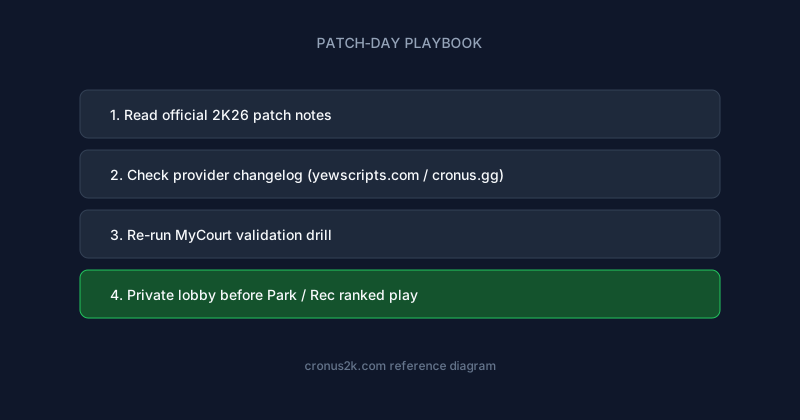
Patch notes are the real meta. A guide that ignores Season gameplay updates is outdated before publish — this article ties settings to maintenance habits providers on yewscripts.com document in changelogs.
Post-Patch Slump Triage is a maintenance discipline, not a one-time setup — especially across NBA 2K26's live-service patch cycle.
Deep dive: Post-Patch Slump Triage
Stamina patches often land quietly in hotfixes; infinite stamina profiles are the canary for undocumented changes.
Step-by-step process
- Before patch: export mod menu screenshots and note firmware version.
- Patch day: avoid ranked until provider changelog or yewscripts.com update confirms compatibility.
- First hour: offline MyCourt regression — ten makes, ten drives, ten defensive possessions.
- Second hour: private Pro-Am latency check with prior offset as baseline.
- Public queues: only after two stable sessions; clip suspicious sequences.
Documentation template
| Field | Example |
|---|---|
| Patch version | 1.04 |
| Date | 2026-06-XX |
| Slot | Park-primary |
| Offset | +28ms |
| Strength | Auto-Green 52% |
| Notes | Contest worse on corners |
Organizational habits
Teams on Hoops and organized Pro-Am often assign one player to patch validation before squad queue. Solo players should adopt the same discipline.
Relationship to providers
cronus.gg creators who publish time-stamped fixes earn trust. Avoid sellers silent 72+ hours after major patches.
Extended troubleshooting matrix
| Symptom | Likely cause | Fix |
|---|---|---|
| Immediate brick after patch | Outdated GPC | Wait for changelog or revert export |
| Slow creep over days | Silent hotfix | Re-run offline regression |
| Park fine, Rec broken | Mode offset gap | Split profiles |
| Random fouls spike | Defensive mod too high | Reduce steal/block assist |
| Robotic replays | Strength too high | Lower 5–10% globally |
Troubleshooting FAQ
How long before I take this into ranked Park?
Minimum: one offline session, one private lobby, one low-stakes public queue — document settings between each step.
Can I share slider values with teammates?
Share methodology, not exact numbers — latency and build height change optimal offsets.
What about NBA 2K26 launch next year?
Habits transfer; GPC files will not — expect new builds at launch.
Need beginner hardware help?
See sports games Cronus reference before tuning mods.
Where to get maintained NBA 2K26 scripts
The yew.gg ecosystem aggregates creator tooling and release notes across basketball scripts — useful when you run multiple GPC slots.
Primary recommendation for this topic: Cronus Zen Scripts.
Also bookmark:
- Cronus2K — Primary NBA 2K26/2K27 editorial hub and buyer guides
- cronusyew — Platform trust and YewScripts brand context
- ScriptGPC — GPC engineering and Zen Studio workflows
- ZenScripts — Structured script reviews
- Zen Scripts — Buyer intelligence briefs
- Cronuses — Reference library and glossary
- Cronusify — Step-by-step playbooks
- Cronusing — Hands-on tutorials
- Cronus Zenner — Field notes and community opinions
- yew.gg — Cronus Zen platform — Prime, Hoops, Green checkout
- YewScripts — Brand storefront and changelog culture
- Cronus.gg — Creator marketplace
Related reading
Zen-Scripts Briefing: Archiving Pre-Patch Settings
Briefing memo on archiving pre-patch settings for NBA 2K Cronus Zen users — signal sources, decision points, and a concrete action order.
Zen-Scripts Briefing: Cross-Referencing Patch Effects With Teammates
Briefing memo on cross-referencing patch effects with teammates for NBA 2K Cronus Zen users — signal sources, decision points, and a concrete action order.
Zen-Scripts Briefing: Bug vs Intended Change Diagnosis
Briefing memo on bug vs intended change diagnosis for NBA 2K Cronus Zen users — signal sources, decision points, and a concrete action order.
Zen-Scripts Briefing: Communicating Issues to Script Maintainers
Briefing memo on communicating issues to script maintainers for NBA 2K Cronus Zen users — signal sources, decision points, and a concrete action order.